Follow a budget from your time tracker
The situation
Section titled “The situation”A client has a fixed budget of hours. Your team logs time in Harvest or Toggl. You want SRP to tell you when the hours are running ahead of the work, without anyone copying numbers across.
The setup
Section titled “The setup”- Go to Settings → Integrations and connect your tracker. Harvest asks which account to share. Toggl Track takes the API token from your Toggl profile, plus the organization id from the app URL for a Toggl 2.0 key. SRP only reads projects and hours.
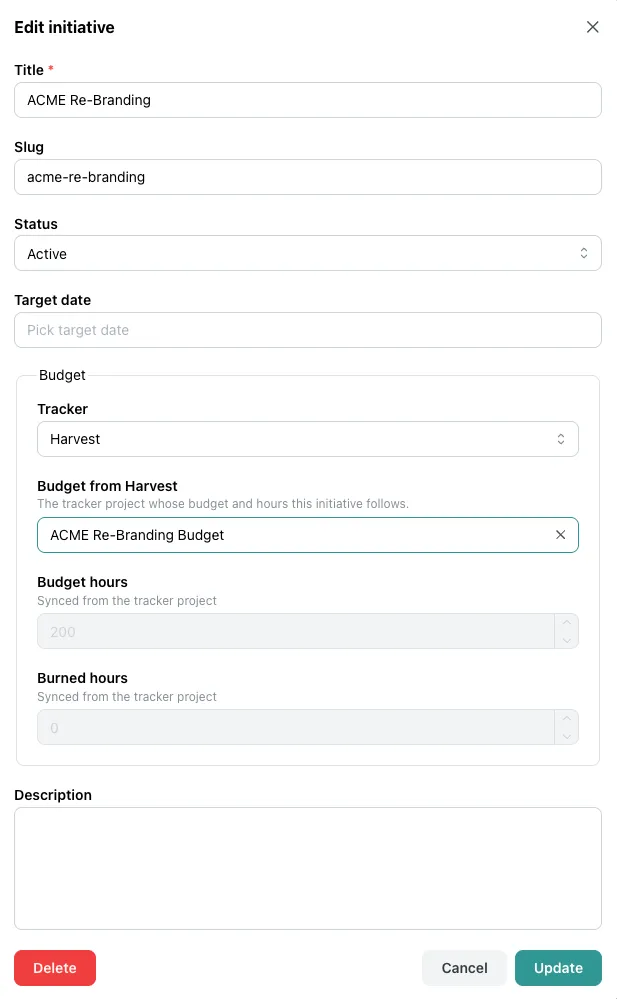
- Open the initiative that carries the promise, or create one. In the Budget section, pick the tracker project under Budget from Harvest or Budget from Toggl Track. The budget and burned hours fill in and lock.
- Save. From now on the hours sync every hour.
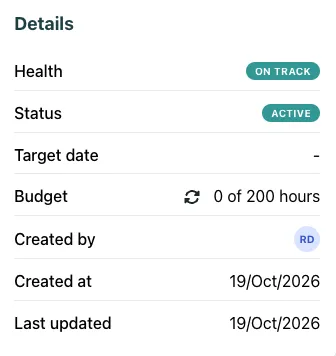
When you cannot wait an hour, open the initiative and click the sync control next to the budget. It shows when the last sync ran.
On the initiative page, the Details panel shows the budget with the sync control next to it.
What SRP does with it
Section titled “What SRP does with it”- The initiative shows burned of total hours. The Needs Attention widget on the dashboard shows the same as a bar.
- When burned hours reach the budget with work still open, the initiative goes critical with the reason Budget exhausted.
- When more than half the budget is burned and burn runs ahead of completion by more than the margin in Settings, the initiative goes at risk with the reason Burning faster than closing.
See Health. Limits and what syncs are in Integrations and Toggl.